
Problem
Conflicting VIBs while upgrading ESXi 6.0 to ESXi 6.5 on Dell Inc. PowerEdge R830 Server. I got the below error while upgrading ESXi 6.0 to 6.5 on Dell Inc. PowerEdge R830 Server.
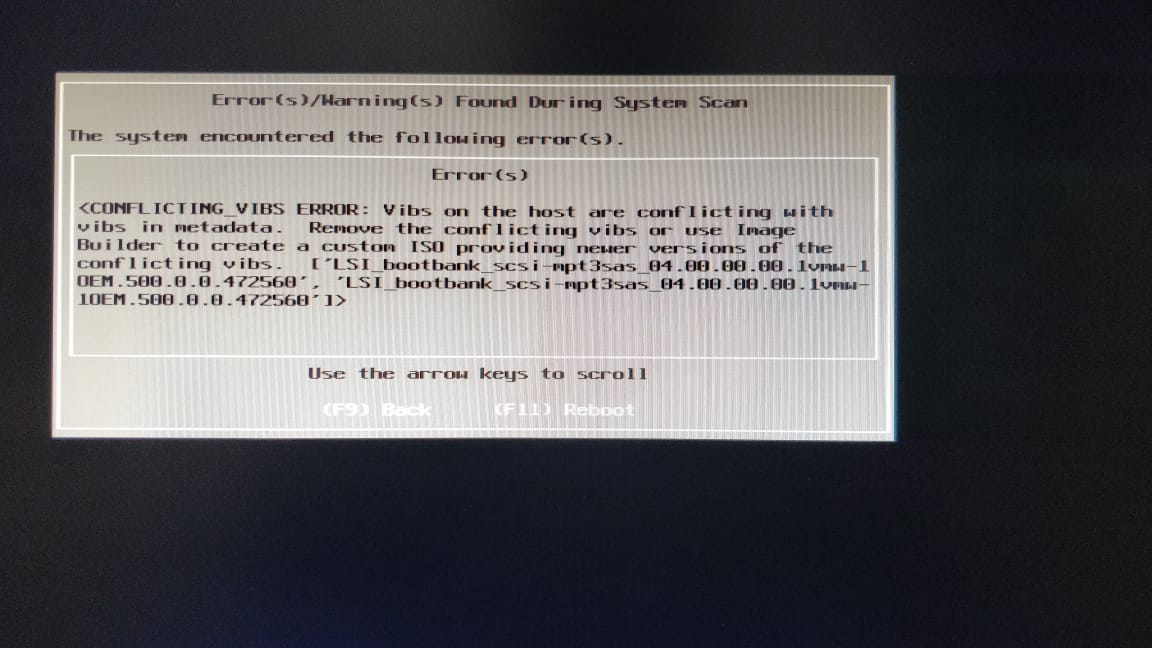
Conflicting VIBs upgrading ESXi 6.0 to 6.5 on Dell Inc. PowerEdge R830 Server
To resolve the above error and proceed further with upgrading ESXi 6.0 to ESXi 6.5, I followed the steps given below:
Solution
Login to ESXi machine as root user through PuTTY. SSH should be allowed on the ESXi host to access the ESXi host through puTTY. Run the below command to see all the VIBs installed on the host.
~ # esxcli software vib list
Name                           Version                                Vendor    Acceptance Level  Install Date
-----------------------------  -------------------------------------  --------  ----------------  ------------
misc-cnic-register             1.710.30.v55.1-1OEM.550.0.0.1331820    Broadcom  VMwareCertified   2015-09-22
net-bnx2                       2.2.5f.v55.6-1OEM.550.0.0.1331820      Broadcom  VMwareCertified   2015-09-22
net-bnx2x                      2.710.39.v55.2-1OEM.550.0.0.1331820    Broadcom  VMwareCertified   2015-09-22
net-cnic                       2.710.35.v55.5-1OEM.550.0.0.1331820    Broadcom  VMwareCertified   2015-09-22
net-tg3                        3.136h.v55.1-1OEM.550.0.0.1331820      Broadcom  VMwareCertified   2015-09-22
scsi-bnx2fc                    1.710.35.v55.1-1OEM.550.0.0.1331820    Broadcom  VMwareCertified   2015-09-22
scsi-bnx2i                     2.710.30.v55.4-1OEM.550.0.0.1331820    Broadcom  VMwareCertified   2015-09-22
dell-configuration-vib         5.5-2A00                               Dell      PartnerSupported  2015-09-22
elxnet                         10.2.298.5-1OEM.550.0.0.1331820        Emulex    VMwareCertified   2015-09-22
ima-be2iscsi                   10.2.250.0-1OEM.550.0.0.1331820        Emulex    VMwareCertified   2015-09-22
lpfc                           10.2.340.18-1OEM.550.0.0.1331820       Emulex    VMwareCertified   2015-09-22
scsi-be2iscsi                  10.2.250.0-1OEM.550.0.0.1331820        Emulex    VMwareCertified   2015-09-22
net-igb                        5.2.5-1OEM.550.0.0.1331820             Intel     VMwareCertified   2015-09-22
net-ixgbe                      3.21.4-1OEM.550.0.0.1331820            Intel     VMwareCertified   2015-09-22
scsi-megaraid-perc9            6.901.55.00-1OEM.550.0.0.1331820       LSI       VMwareCertified   2015-09-22
scsi-mpt2sas                   18.00.00.00.1vmw-1OEM.550.0.0.1198610  LSI       VMwareCertified   2015-09-22
scsi-mpt3sas                   04.00.00.00.1vmw-1OEM.500.0.0.472560   LSI       VMwareCertified   2015-09-22
mtip32xx-native                3.9.4-1OEM.550.0.0.1331820             MICRON    VMwareCertified   2015-09-22
net-mlx4-core                  1.9.9.0-1OEM.550.0.0.1331820           Mellanox  VMwareCertified   2015-09-22
net-mlx4-en                    1.9.9.0-1OEM.550.0.0.1331820           Mellanox  VMwareCertified   2015-09-22
ima-qla4xxx                    500.2.01.31-1vmw.0.3.100400            QLogic    VMwareCertified   2015-09-22
net-qlcnic                     5.5.190-1OEM.550.0.0.1331820           QLogic    VMwareCertified   2015-09-22
net-qlge                       3.0.0.58-1OEM.550.0.0.1331820          QLogic    VMwareCertified   2015-09-22
qlnativefc                     1.1.29.0-1OEM.550.0.0.1331820          QLogic    VMwareCertified   2015-09-22
scsi-qla4xxx                   644.55.34.0-1OEM.550.0.0.1331820       QLogic    VMwareCertified   2015-09-22
ata-pata-amd                   0.3.10-3vmw.550.0.0.1331820            VMware    VMwareCertified   2015-09-22
ata-pata-atiixp                0.4.6-4vmw.550.0.0.1331820             VMware    VMwareCertified   2015-09-22
ata-pata-cmd64x                0.2.5-3vmw.550.0.0.1331820             VMware    VMwareCertified   2015-09-22
ata-pata-hpt3x2n               0.3.4-3vmw.550.0.0.1331820             VMware    VMwareCertified   2015-09-22
ata-pata-pdc2027x              1.0-3vmw.550.0.0.1331820               VMware    VMwareCertified   2015-09-22
ata-pata-serverworks           0.4.3-3vmw.550.0.0.1331820             VMware    VMwareCertified   2015-09-22
ata-pata-sil680                0.4.8-3vmw.550.0.0.1331820             VMware    VMwareCertified   2015-09-22
ata-pata-via                   0.3.3-2vmw.550.0.0.1331820             VMware    VMwareCertified   2015-09-22
block-cciss                    3.6.14-10vmw.550.0.0.1331820           VMware    VMwareCertified   2015-09-22
ehci-ehci-hcd                  1.0-3vmw.550.0.0.1331820               VMware    VMwareCertified   2015-09-22
esx-base                       5.5.0-2.33.2068190                     VMware    VMwareCertified   2015-09-22
esx-dvfilter-generic-fastpath  5.5.0-0.0.1331820                      VMware    VMwareCertified   2015-09-22
esx-tboot                      5.5.0-2.33.2068190                     VMware    VMwareCertified   2015-09-22
esx-xlibs                      5.5.0-0.0.1331820                      VMware    VMwareCertified   2015-09-22
esx-xserver                    5.5.0-0.0.1331820                      VMware    VMwareCertified   2015-09-22
ipmi-ipmi-devintf              39.1-4vmw.550.0.0.1331820              VMware    VMwareCertified   2015-09-22
ipmi-ipmi-msghandler           39.1-4vmw.550.0.0.1331820              VMware    VMwareCertified   2015-09-22
ipmi-ipmi-si-drv               39.1-4vmw.550.0.0.1331820              VMware    VMwareCertified   2015-09-22
misc-drivers                   5.5.0-2.33.2068190                     VMware    VMwareCertified   2015-09-22
net-be2net                     4.6.100.0v-1vmw.550.0.0.1331820        VMware    VMwareCertified   2015-09-22
net-e1000                      8.0.3.1-3vmw.550.0.0.1331820           VMware    VMwareCertified   2015-09-22
net-e1000e                     1.1.2-4vmw.550.1.15.1623387            VMware    VMwareCertified   2015-09-22
net-enic                       1.4.2.15a-1vmw.550.0.0.1331820         VMware    VMwareCertified   2015-09-22
net-forcedeth                  0.61-2vmw.550.0.0.1331820              VMware    VMwareCertified   2015-09-22
net-nx-nic                     5.0.621-1vmw.550.0.0.1331820           VMware    VMwareCertified   2015-09-22
net-vmxnet3                    1.1.3.0-3vmw.550.0.0.1331820           VMware    VMwareCertified   2015-09-22
ohci-usb-ohci                  1.0-3vmw.550.0.0.1331820               VMware    VMwareCertified   2015-09-22
rste                           2.0.2.0088-4vmw.550.1.15.1623387       VMware    VMwareCertified   2015-09-22
sata-ahci                      3.0-20vmw.550.2.33.2068190             VMware    VMwareCertified   2015-09-22
sata-ata-piix                  2.12-10vmw.550.2.33.2068190            VMware    VMwareCertified   2015-09-22
sata-sata-nv                   3.5-4vmw.550.0.0.1331820               VMware    VMwareCertified   2015-09-22
sata-sata-promise              2.12-3vmw.550.0.0.1331820              VMware    VMwareCertified   2015-09-22
sata-sata-sil24                1.1-1vmw.550.0.0.1331820               VMware    VMwareCertified   2015-09-22
sata-sata-sil                  2.3-4vmw.550.0.0.1331820               VMware    VMwareCertified   2015-09-22
sata-sata-svw                  2.3-3vmw.550.0.0.1331820               VMware    VMwareCertified   2015-09-22
scsi-aacraid                   1.1.5.1-9vmw.550.0.0.1331820           VMware    VMwareCertified   2015-09-22
scsi-adp94xx                   1.0.8.12-6vmw.550.0.0.1331820          VMware    VMwareCertified   2015-09-22
scsi-aic79xx                   3.1-5vmw.550.0.0.1331820               VMware    VMwareCertified   2015-09-22
scsi-fnic                      1.5.0.4-1vmw.550.0.0.1331820           VMware    VMwareCertified   2015-09-22
scsi-hpsa                      5.5.0-44vmw.550.0.0.1331820            VMware    VMwareCertified   2015-09-22
scsi-ips                       7.12.05-4vmw.550.0.0.1331820           VMware    VMwareCertified   2015-09-22
scsi-lpfc820                   8.2.3.1-129vmw.550.0.0.1331820         VMware    VMwareCertified   2015-09-22
scsi-megaraid-mbox             2.20.5.1-6vmw.550.0.0.1331820          VMware    VMwareCertified   2015-09-22
scsi-megaraid-sas              06.803.52.00-1vmw.550.0.0.1331820      VMware    VMwareCertified   2015-09-22
scsi-megaraid2                 2.00.4-9vmw.550.0.0.1331820            VMware    VMwareCertified   2015-09-22
scsi-mptsas                    4.23.01.00-9vmw.550.0.0.1331820        VMware    VMwareCertified   2015-09-22
scsi-mptspi                    4.23.01.00-9vmw.550.0.0.1331820        VMware    VMwareCertified   2015-09-22
scsi-qla2xxx                   902.k1.1-9vmw.550.0.0.1331820          VMware    VMwareCertified   2015-09-22
uhci-usb-uhci                  1.0-3vmw.550.0.0.1331820               VMware    VMwareCertified   2015-09-22
tools-light                    5.5.0-2.33.2068190                     VMware    VMwareCertified   2015-09-22
~ #
Check the drivers used by the available Network cards, here below command is showing that NICs are using the tg3 driver manufactured by Broadcom.
~ # esxcli network nic list
Name    PCI Device     Driver  Link  Speed  Duplex  MAC Address         MTU  Description
------  -------------  ------  ----  -----  ------  -----------------  ----  -------------------------------------------------------
vmnic0  0000:001:00.0  tg3     Up     1000  Full    54:9f:35:22:1b:20  1500  Broadcom Corporation NetXtreme BCM5720 Gigabit Ethernet
vmnic1  0000:001:00.1  tg3     Down      0  Half    54:9f:35:22:1b:21  1500  Broadcom Corporation NetXtreme BCM5720 Gigabit Ethernet
vmnic2  0000:002:00.0  tg3     Down      0  Full    54:9f:35:22:1b:22  1500  Broadcom Corporation NetXtreme BCM5720 Gigabit Ethernet
vmnic3  0000:002:00.1  tg3     Down      0  Full    54:9f:35:22:1b:23  1500  Broadcom Corporation NetXtreme BCM5720 Gigabit Ethernet
~ #
As error details show that the problem was due to drivers manufactured by LSI, so we need to remove the LSI drivers.
~ # esxcli software vib list |grep LSI
scsi-megaraid-perc9            6.901.55.00-1OEM.550.0.0.1331820       LSI       VMwareCertified   2015-09-22
scsi-mpt2sas                   18.00.00.00.1vmw-1OEM.550.0.0.1198610  LSI       VMwareCertified   2015-09-22
scsi-mpt3sas                   04.00.00.00.1vmw-1OEM.500.0.0.472560   LSI       VMwareCertified   2015-09-22
~ #
Use the below command to remove the driver scsi-mpt3sas manufactured by LSI, it will remove the installed drivers.
~ # esxcli software vib remove -n scsi-mpt3sas
Removal Result
   Message: The update completed successfully, but the system needs to be rebooted for the changes to be effective.
   Reboot Required: true
   VIBs Installed:
   VIBs Removed: LSI_bootbank_scsi-mpt3sas_04.00.00.00.1vmw-1OEM.500.0.0.472560
   VIBs Skipped:
~ #
Drivers have been removed but it’s still showing when I tried to list down.
~ # esxcli software vib list |grep LSI
scsi-megaraid-perc9            6.901.55.00-1OEM.550.0.0.1331820       LSI       VMwareCertified   2015-09-22
scsi-mpt2sas                   18.00.00.00.1vmw-1OEM.550.0.0.1198610  LSI       VMwareCertified   2015-09-22
scsi-mpt3sas                   04.00.00.00.1vmw-1OEM.500.0.0.472560   LSI       VMwareCertified   2015-09-22
~ #
After rebooting the machine/server, when I tried to list down the removed driver it was not showing. It means the driver has been removed successfully.
[root@PCPEPSBM2:~] esxcli software vib list |grep LSI
scsi-megaraid-perc9            6.901.55.00-1OEM.550.0.0.1331820     LSI       VMwareCertified   2018-11-12
[root@PCPEPSBM2:~]
After removing the driver, I tried to upgrade the ESXi 6.0 to ESXi 6.5, it upgraded successfully.
Last Updated: February 11, 2019